.png?width=765&height=430&name=Blog%20header%20templates%20(35).png)
On July 1st, 2025, a major update to the Florida Supreme Court’s SC2023-1401 rules went into effect. These changes — intended to transition Florida courts to digital-first operations — established consistent eFiling standards across all Florida courts, including new standards for how filing errors are treated. Now there’s more pressure on filers to guard against errors.
What changed in the Florida eFiling rules (SC2023-1401)?
Under the updated rules, clerks are now required to accept most filings, even if they’re flawed or contain errors. There are now only seven types of errors for which the clerk can send filings to the correction queue. All other errors will hit the docket immediately.
What are the seven reasons why a Florida court filing will be placed in the correction queue?
To understand the additional risk for filers, consider how narrow the rejection criteria now are. Now, according to the Florida Bar Association, a filing will only be sent to the correction queue if it:
- Is filed after a case number has been assigned but lacks the correct case number, and the correct number cannot be reliably identified.
- Lacks a case style or contains the wrong case style.
- Combines multiple documents filed as one document.
- Splits a multi-page document into separate files.
- Is a proposed order, unless filed under a notice of filing to preserve the record.
- Is illegible, corrupt, or blank.
- Is barred by court order or otherwise incapable of being filed in the clerk’s case maintenance system.
“Outside of these seven conditions, all filings must be docketed immediately and without intervention, even if they contain substantive or technical errors,” writes Crystal Kinzel, Clerk of the Circuit Court and Comptroller in Collier Country, Florida. “The court will enforce any consequences resulting from the errors.”
What happens if document(s) are sent to the correction queue?
If your documents are sent to the correction queue, you’ll need to correct the errors and refile them, which could result in missed deadlines or delays.
The good news is you’ll have more time to correct a filing after it’s sent to the correction queue. Prior to the changes made on July 1st, a filer would only have five days to correct and resubmit their document before it would be moved to an abandoned queue. Now filers will have up to thirty days to correct and resubmit their documents, and the option to file a Motion for Consideration if they disagree with the reasoning for their document(s) being moved to the correction queue.
The bad news is that any filing that doesn’t contain errors in these seven errors will make it to the docket, even if it contains other kinds of mistakes.
What happens if a filing that contains errors is accepted?
Errors in an accepted document must be corrected through additional filings or court actions, rather than through the court clerk. According to the Southern District of Florida, “to fix your mistake, you must first file a ‘Notice of Striking.’ The Notice of Striking must be linked and refer to the ‘wrong’ document.” After you file the Notice of Striking, you will need to re-file the correct document.
Why are eFiling errors more dangerous since 2025?
These changes mean that, while filers may see fewer rejections from the clerk, that’s mostly because more errors are now able to hit the docket, putting more pressure on filers to catch their own mistakes.
“This change underscores a significant shift in responsibility,” writes Kinzel. “Attorneys must now take full ownership of their filings, both in content and form.”
These errors can become part of the official record immediately, and deadlines may be impacted if filings are deemed deficient later. If mistakes are made, filers must work with the court, not the clerk, to address the mistake, which often gives them less flexibility.
According to Kinzel, consequences for mistakes not caught by the clerk can include:
- Delayed hearings
- Improper case management tracks
- Appropriate agencies not receiving notification because critical information is missing from documents
- Official records being recorded with invalid information
- Enforcement delays caused by incorrect data
- Duplicate, non-refundable filing fees when filed in wrong jurisdiction
- Incorrect case statistics leading to judicial or county funding deficits
Filers now face greater procedural and professional risk than they did before. To avoid negative consequences, filers should understand the most common filing mistakes and how to avoid them.
What are the most common errors Florida eFilers make?
Between March and April 2025, InfoTrack saw 3,005 documents submitted to the Florida Trial Courts — 2.09% of which ended up in the correction queue. During March and April 2026, we saw 6196 documents submitted to the Florida Trial Courts with only 1.19% of those filings ending up in the correction queue. Below is a breakdown of the most common reasons documents were moved to the correction queue:
- Is barred by order of court or is otherwise incapable of being filed in the clerk’s case maintenance system. (35.13%)
- Lacks a case style or has the wrong case style. (22.97%)
- It is filed after a case number is assigned and lacks a correct case number and the correct case number cannot be reliably and easily identified. (20.27%)
Note: this rejection can cause confusion for filers as they may not understand it is referencing the documents lacking or referencing the incorrect case number. - Is illegible, corrupt, or blank (16.21%)
- Consists of multiple documents filed as one document. (4.05%)
- Consists of multi-page document filed as separate documents. (1.35%)
With a rejection rate nearly half what it was before, it stands to reason that some of the mistakes that resulted in rejections previously could be making it to the court docket now. Prior to the change, the five most common rejection reasons we saw were:
- Documents and case information not matching
- Issue viewing document(s)
- Incomplete Document(s)
- Missing Court Fees
- Not court rule compliant
Some of these errors — like missing or incorrect case numbers and illegible, corrupt, or blank documents — will likely be caught and sent to the correction queue under the new rules, but that can still cause delays in the case.
The biggest risk, however, are the errors that will make it through to the docket — like court rule non-compliance or missing fees. While some courts may informally alert filers to missing fees, that is not a guarantee under these new rules. These are the types of errors that could compromise a case if the filer doesn’t catch them.
How to avoid eFiling mistakes in Florida
Internal processes must fill the gap to prevent the kinds of filing mistakes Florida courts used to catch.
Paralegals and legal support professionals are now the front line of filing accuracy, with an even greater responsibility for pre-filing review and an increased need for disciplined processes and efficient workflows that reduce risk. In many firms, eFiling success will be a direct reflection of internal workflows.
Step 1: Double-check local court rules
Each county and case type will have different court rules, requiring different case information or document types to be added to the filing. Make sure you know all relevant jurisdictional and bench rules before submitting — or even beginning to assemble — your filing.
Step 2: Validate case information
Even a small typo can cause major issues. Before uploading anything, confirm:
- The case number
- The court jurisdiction
- All party names and case style
Step 3: Follow proper document structure
Starting out organized pays off later on. Before you submit, make sure your filing includes:
- One document per document type or code
- Clearly labeled file names
- Logical organization of exhibits and attachments
Step 4: Review all attachments
Don’t let an attachment hiccup spoil hours of work. Ensure your filing has:
- No missing exhibits
- Documents in the correct order
- Complete and final versions uploaded
Step 5: Implement a pre-filing checklist
A check list is always helpful in ensuring a complete and correct filing. Check every filing against a standardized checklist that includes:
- Case details verification
- Document formatting review
- Attachment confirmation
- Filing type selection
Step 6: Double-Check Portal Entries
Errors in filing codes, document types, or service contacts can create downstream complications, even if the filing is accepted. It's always worth one more check before filing.
Let InfoTrack help you catch filing errors before they become a problem
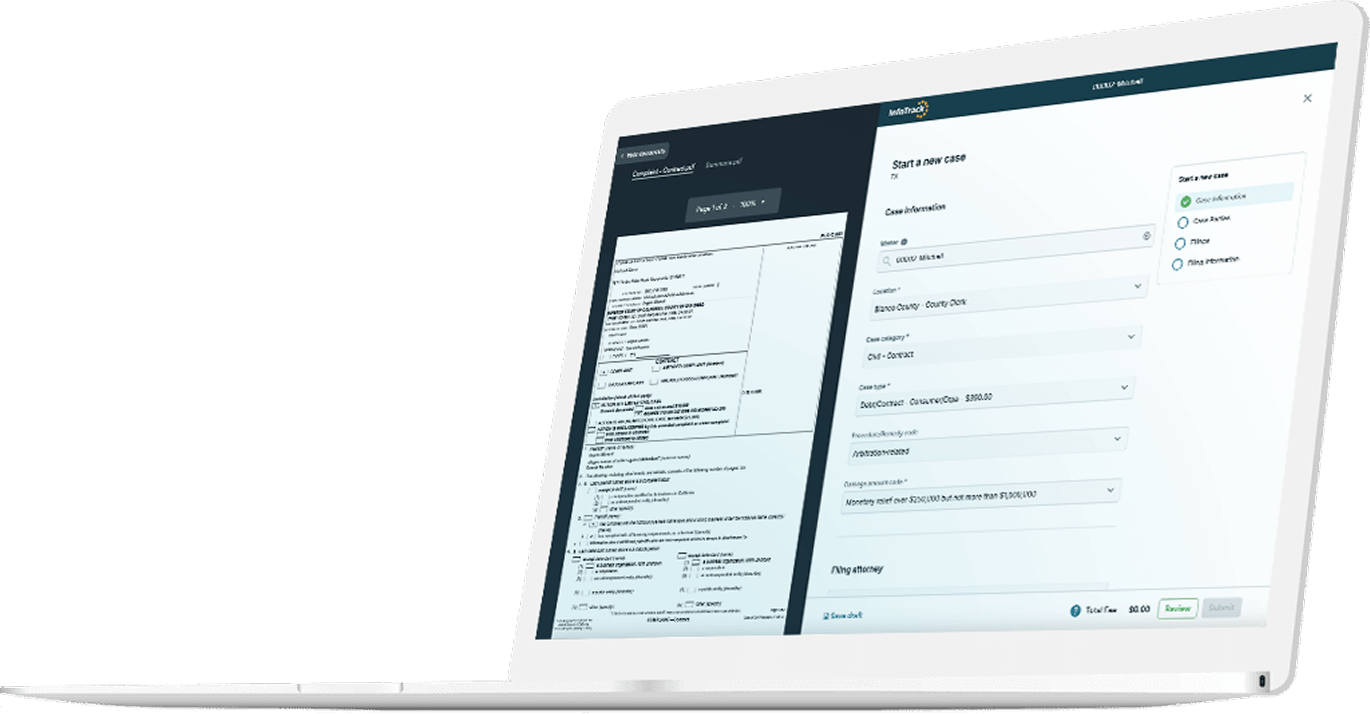
Even the most dedicated team can only do so much to reduce the risk of errors. That’s OK — technology can help. InfoTrack reduces rejection rates by reading your uploaded documents and auto-filling 95% of fields, so filings can be submitted in under 30 seconds. As a result, our clients see rejection rates under 5%, against an industry average of around 9%.
Court-specific validation also catches jurisdiction errors before you submit. InfoTrack will extract all the case parties from the document for you, ensuring that all case parties are added to the filing and removing the burden of having to re-key all the case party data into the filing form from the filer.
When reviewing a filing, InfoTrack’s side by side view allows you to view the document alongside the case information, giving yourself a better opportunity to validate case information and correct uploaded document(s). And InfoTrack will display the breakdown of fees associated with your filing before submitting to the court, allowing you the option to verify all fees have been added, and giving you peace of mind before you press the submit button.
Florida’s updated eFiling rules prioritize speed and efficiency — but they also remove a critical layer of protection, putting more of the burden of accuracy on filers. The firms that succeed under these rules will be the those with strong litigation workflows that reduce the risk of every type of error.
Create your free account to see how InfoTrack can support your team’s workflow and reduce filing errors.