.png?width=765&height=430&name=Blog%20header%20templates%20(36).png)
Texas Courts use a statewide portal called eFileTexas to facilitate eFiling for legal teams across jurisdictions. Legal teams can choose a certified third-party eFiling service provider (EFSP) integrated with eFileTexas to connect to the courts. When filing in Texas with a third-party EFSP, legal teams should consider which additional features and integrations would most help improve efficiency and reduce the risk of filing errors.
In 2014, Texas was one of the first states to introduce a statewide, standardized eFiling portal, and in 2016, that portal expanded to cover all 254 Texas counties. The state is now home to the largest state-wide electronic court records system in the country.
“The ease and stability of e-filing within our state cannot be understated, especially during a few key challenging times over the past decade,” said Nathan Hecht, Chief Justice of the Supreme Court of Texas. “During Hurricane Harvey, e-filing allowed us to continue our courts’ online operations after flooding and related damage shut down many of our local county courthouses. During the COVID-19 pandemic, e-filing again allowed us to keep court operations going after the pandemic severely impacted in-person interactions in our courts and clerks’ offices.”
As of February 2024, eFileTexas had processed over 100 million filings by more than 760,000 registered users, in partnership with 24 electronic filing service providers and 11 integrated case management system vendors.
For attorneys, paralegals, and other legal professionals new to filing in Texas, it’s essential to understand how this large state portal system operates, how to choose the right EFSP, and how to submit accurate eFilings to avoid returns for correction.
Key takeaways:
- Texas attorneys and paralegals are generally required to eFile in most courts through the statewide court filing portal—eFileTexas.
- Texas filers must choose a state-certified eFiling Service provider (EFSP) to file through eFileTexas.
- Choosing the right EFSP can have added benefits for legal teams.
- A standardized filing workflow can dramatically reduce errors and missed deadlines.
What is eFileTexas?
eFileTexas (sometimes referred to as Odyssey) is the statewide electronic court filing system for Texas courts, a cloud-based solution that manages and routes eFiled documents. eFileTexas and the state’s electronic filing manager (EFM) are provided by Tyler Technologies, a software company that creates digital solutions for the public sector, including courts and justice systems, nationwide. In Texas, filers also use third-party Electronic Filing Service Providers (EFSPs) to connect to eFileTexas.
What is an Electronic Filing Service Provider (EFSP)?
An EFSP is a filing platform that formats files, calculates filing fees and serves opposing counsel, then transmits the filing to the eFiling manager (EFM). In Texas, filers use third-party EFSPs like InfoTrack to connect to the state system. The state’s EFM receives the filing from the EFSP and routes it to the selected court. Once the court clerk has reviewed the documents, the EFM will send either endorsed copies of the filing or a notice of return for correction back to the EFSP.
Many legal professionals in other states where a third-party EFSP isn’t required still use one to auto-fill data fields, manage filing fees, or take advantage of other features that make the filing process faster and easier.
How do you choose a third-party EFSP?
Selecting a third-party EFSP gives Texas filers an opportunity to choose their preferred interface for filing with the court. Take advantage of this opportunity to select an EFSP that can do more than what the state court portal can offer and reap exponential benefits. Some things to keep in mind when selecting a provider:
Court Certification
To eFile with eFileTexas your EFSP will need to be a court-certified provider.
Integrations
What tools does the provider integrate with, and how can those integrations make for a more efficient filing workflow? For example, InfoTrack is a certified EFSP in Texas and integrates with many of the most commonly used case management systems, so all activity on a matter in InfoTrack is tracked back to the matter in your case management system. And since filing fees are paid in the EFSP, look for a provider that can track those fees and track them back to your billing and expense management tools. If you rely on a case management system or any additional eFiling tools in your workflow, look for an EFSP that can integrate effectively with those tools. For example, InfoTrack integrates with LawToolBox to offer automating calendaring and deadline management.
Billing and expense support
A provider that integrates with your case management system will be able to sync filing expenses and billable entries back to your case management system. On top of that, InfoTrack pays for court filings, convenience fees, and service of process orders up front and bills for them monthly, further streamlining the billing process.
Compliance and auditing
A good EFSP ensures compliance with local rules by helping to format documents and auto filling data to reduce data entry errors. Expense tracking capabilities support also assists in the audit process.
Additional features
Some EFSPs offer features beyond what eFileTexas requires that can reduce the manual work on the case and streamline your litigation workflow. Since you have the option to choose a filing interface, look for one that provides additional benefits to your team.
Is eFiling mandatory in Texas?
Yes, eFiling is mandatory across all 254 counties for most filing types and in most courts. Attorneys and paralegals are prohibited from submitting paper documents unless there is an emergency, or your case qualifies for a rare exception.
Courts where eFiling is required:
- Supreme Court of Texas
- Courts of Appeals
- District Courts
- County Courts
- Probate Courts
- Family Courts
- Criminal Courts*
*eFiling is generally used for subsequent filings in criminal courts, but cases may need to be initiated by physical filing.
What exceptions are there?
There are limited exceptions for certain case and document types including:
- Juvenile cases under Title 3 of the Family Code
- Truancy cases under Title 3 of the Family Code
- Wills
- Documents filed under seal
- Documents presented to the court in camera
- Documents to which access is restricted by court order or law
Other documents may also be subject to exemption for good cause.
Attorney vs. self-represented filer requirements
While eFiling is mandated for attorneys, pro se litigants are permitted to file physical documents. Self-represented litigants who do wish to eFile can use the free state-provided EFSP or Self Help platform.
What are the benefits of eFiling in Texas?
Having a state-wide eFiling system helps streamline and standardize filing practices across courts, resulting in several benefits for busy legal professionals:
- 24/7 availability: Attorneys and paralegals can submit filings anytime, from anywhere.
- Extended filing windows: Instead of rushing to meet 5 p.m. court deadlines to submit physical documents, legal teams have until 11:59 p.m. on the day of their deadline to submit a filing.
- Faster submissions: Filings are transmitted in real time, and there’s no need to account for postal delivery times or physical handling queues.
- Immediate confirmation: Once you submit, you know right away that your filing has been received.
- Reduced administrative work: eFiling requires less physical document management and can be more efficient, especially when using tools that automate data entry.
- Electronic service options: Once you’ve submitted your filing, you can also serve process to interested parties via email with eService.
Texas eService explained
Texas eService (Electronic Service) is a feature within the state's official digital court system that allows legal filers to send documents electronically to other parties in a case via email. When eFiling through your EFSP, you will often have the option to choose eService when you submit. There are some instances where eService isn’t available, though.
Benefits of Texas eService
- Instant Delivery: eService gets the required documents to the intended recipient immediately.
- Real-Time Tracking: eService can be tracked digitally, and you’ll receive an automated certificate of delivery.
How it works
When filing, you can select eService to serve documents to case parties via email, but it can’t be used in all circumstances.
- Filing types: eService can be used for motions, notices, responses, discovery documents and other pleadings to serve parties who have already appeared in the case.
- Limitations: eService cannot be used for a new lawsuit, petition, citation, or when bringing a new party into a case. In those instances, you will need to serve formal service of process through a sheriff, constable, certified mail, or private process server.
- Email opt-in: To receive eService, recipients must have opted in by adding their email address to be listed as a service contact.
- Costs: Your EFSP may charge a small transaction fee for eService, but the cost is typically negligible.
eService vs. Service of Process
Service of process initiates a case and serves court documents to named parties, either through a private process server, certified mail, a sheriff, or another representative depending on local requirements. eService is used to send documents electronically to existing parties in an ongoing case.
How does eFiling work in Texas?
Instead of having to navigate multiple eFiling portals across courts and jurisdictions, Texas eFilers benefit from a unified court system, and they get to use their choice of EFSP to act as their interface with the state system. Otherwise, eFiling in Texas is much the same as eFiling in any other state.
1. Prepare your documents
Every filing requires a “lead document”—an original petition for new cases, or an answer, motion, or Proposed Order for existing cases—as well as a Civil Information Sheet and a fee payment. Additional documents depend on the case type and details, but sensitive information, such as social security and bank account numbers, must be redacted from all documents.
2. Select an Electronic Filing Service Provider (EFSP)
Initiate your filing in your EFSP or select it from the drop-down menu on the eFileTexas to navigate to your chosen platform.
3. Create your filing submission
In your chosen EFSP, initiate a new case or file on an existing case, and enter case details, identify parties, upload documents, calculate fees and review your submission. These components together become your filing “envelope” and will be reviewed by the court together.
4. Choose the correct filing code
When submitting your filing, make sure you have selected the correct filing code. This represents the specific type of document that you are filing into the case and is critical for properly logging the filing on the court side.
5. Pay filing fees
Fees required when filing into a court case typically include the court fees, technology fees required by the court’s system, and any charges for your chosen EFSP. Add a valid payment method to avoid a return for correction.
6. Submit
Review the data you entered for accuracy, confirm that the document itself is correct, then submit the filing in your EFSP.
7. Monitor for acceptance or correction notice
Monitor your EFSP for a notice of acceptance or return for correction. If you receive a correction notice, you must update any incorrect or missing information before resubmitting the envelope.
What is an eFiling envelope?
An envelope is the electronic package submitted to the court through your EFSP. A single envelope may contain one or more documents, as well as fees, and service and case information. Correct organization of documents within the envelope is essential. The primary pleading must be uploaded as the lead document, with supporting materials attached appropriately. And since envelopes are reviewed as a unit, documents that require separate docket entries must be filed separately.
What are the most common causes of returns for correction in Texas?
The most common cause of returns for correction comes down the details:
- Incorrect filing code
- Wrong court or case information
- Document formatting problems
- Missing exhibits
- Confidential information not properly redacted
- Filing in the wrong case category
- Missing fees
- Missing service requests
- Incorrect lead document designation
- Insufficient signatures
- Non-compliance with local rules
Since Texas uses an envelope structure for filings, an error in one document in an envelope will trigger a return of the entire envelope.
Most common filing mistakes come down to simple errors, like incorrect codes or cause numbers. These are the kinds of mistakes a good EFSP can help mitigate. When you prepare an eFiling in InfoTrack, you upload your documents and the platform auto fills form fields, eliminating the risk of human error in data entry.
Following eFiling best practices can also help you avoid errors in the filing process.
Texas eFiling best practices
The key to avoiding a return for correction is preparation. When you’re down to the wire trying to complete a filing by a quickly approaching deadline, mistakes are easier to make. Good filing practices are the first step in submitting error-free eFilings.
Know the local rules
Each filing is subject to local jurisdiction rules and standards—not to mention the bench rules an individual judge may enforce. Again, a good EFSP can help here, checking your submission against local rules. Whether or not you’re using software to improve your efficiency, it’s always best to review the submission yourself before filing to best guard against a return for correction.
File early
Despite some litigation strategies involving delaying filings, you’ll save yourself headaches by filing early so you have time to make any corrections before the deadline. If you wait until the last minute to file, a return for correction could cause a critical delay or even open the door for a dismissal.
Actively monitor submissions
If your filing is returned, you’ll have limited time to make corrections and resubmit. If you resubmit quickly enough, you may be able to retain your original filing date. If you take too long, you can cause a delay in the case schedule. Make sure to monitor the outcome of your filing so you can act quickly in case of a return.
Use a filing checklist
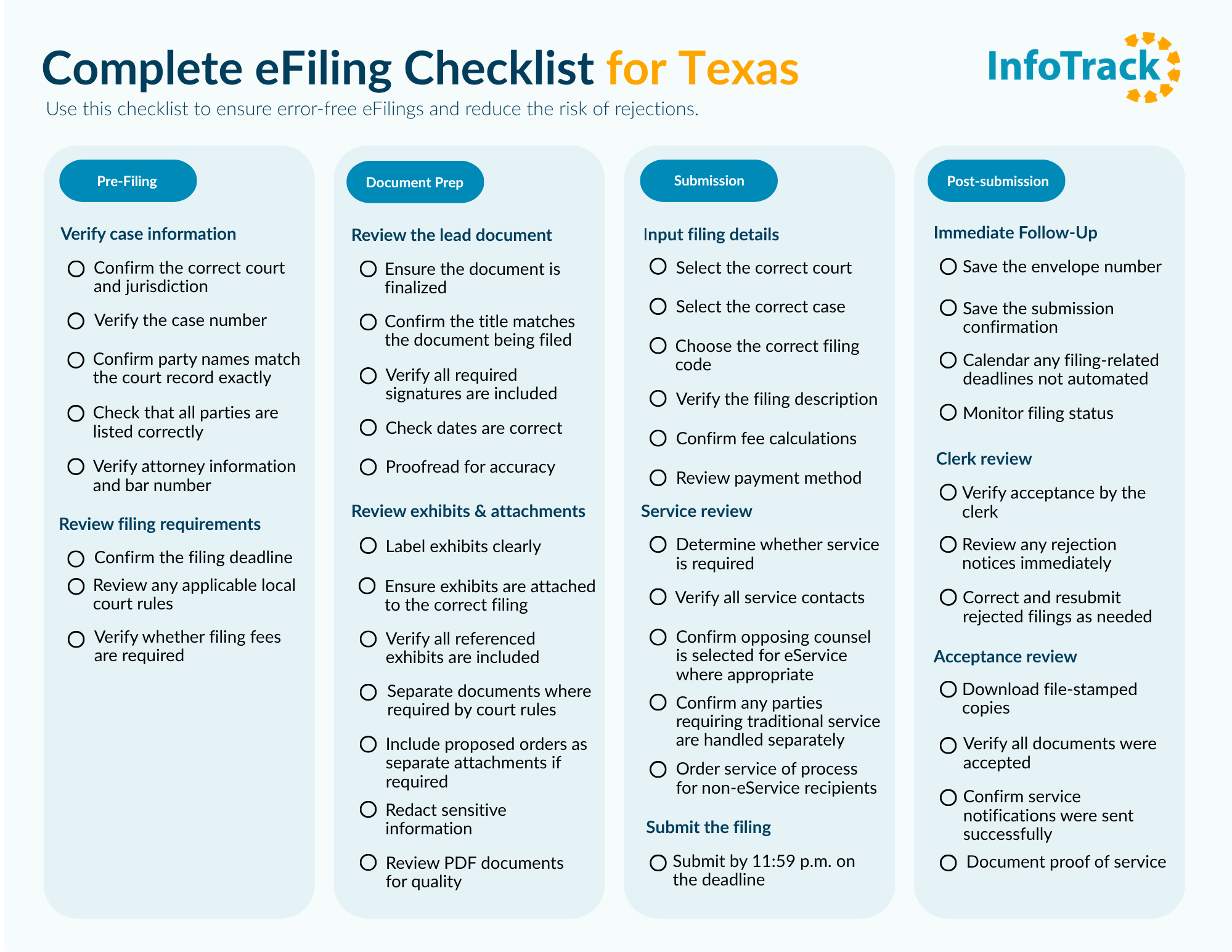
A checklist can help ensure you add and validate all necessary information and documents when preparing your filing. Make sure every item on your checklist is completed before hitting submit.
Texas eFiling checklist
Use this checklist to reduce the risk of returns for correction, missed deadlines, and service issues.
Create an efficient Texas eFiling workflow with InfoTrack
A successful eFiling depends on a lot of detail-oriented work, yet so many legal teams introduce even more opportunities for error with complicated workflows that stretch across multiple disconnected tools that offer limited visibility into a matter.
InfoTrack helps litigation teams save time and reduce returns by unifying litigation work into a single connected workflow that syncs back to your existing case management system.
Time savings
InfoTrack reads your uploaded documents and auto-fills 95% of form fields, and case parties are extracted from the document for you and added to the filing automatically, so you don’t lose time re-keying case data. As a result, filings can be submitted in under 30 seconds.
Fewer returns for correction
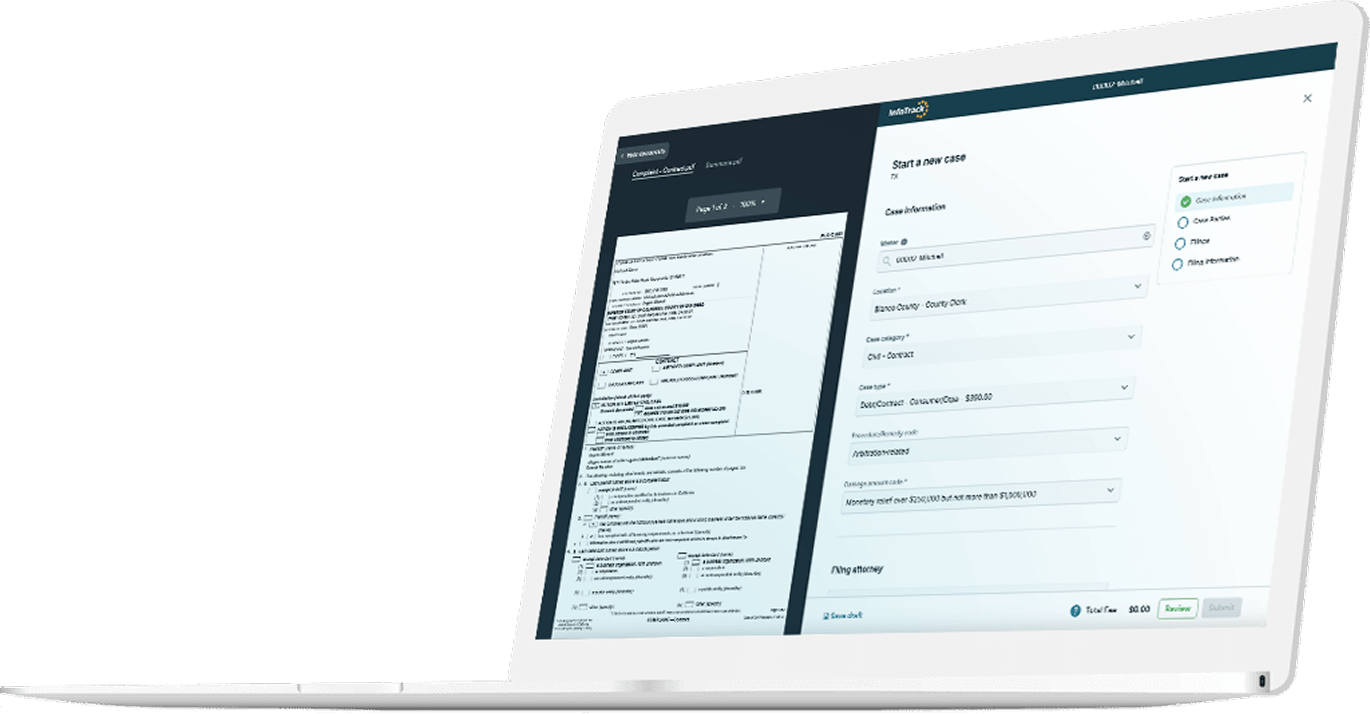
Court-specific validation also helps catch compliance errors before you submit, and InfoTrack’s side by side view allows you to view the document alongside the case information, giving yourself a better opportunity to validate case information and correct uploaded document(s). With these additional features, our clients see return rates under 5%, compared to an industry average of around 9%.
Book a personalized demo to see how InfoTrack can support your team’s workflow and reduce filing errors or create your free account to get started right now.
People also ask
How long does clerk review take?
Typically it takes 1-2 days for the clerk to review an eFiling, but filing times can vary significantly depending on a court’s case volume. Smaller courts may be able to review a filing in a matter of hours, while higher-volume courts can take several days or longer at especially busy times like after holidays or at the end of the month, or if there is a backlog. More complex filings or those with large amounts of evidence attached can also take longer to process than a simpler filing.
What happens if my filing is returned for correction?
If you received a return, review the clerk’s notes as soon as possible, correct the errors and/or supply any missing information or documents, then resubmit. If you’re able to correct the filing quickly, you may still be able to meet your filing deadline. Texas has provisions that may protect filers when a document was submitted on time but returned for a correctable issue. However, those protections depend on the circumstances and applicable court rules, and missing your filing deadline could cause problems in your case moving forward.
How do I find the correct filing code?
All Texas Electronic Filing Service Providers (EFSPs) provide a searchable list of filing codes during the filing process. These are options that are chosen by the court and passed through to the filer. You can typically search by document name, browse filing categories and filter by case type to find the correct code.
When reviewing a code:
- Look for the exact document name, but choose the more general option if the exact document type is unavailable.
- Confirm it matches the document's primary purpose.
- Check whether the court has local preferences.
If you submit your eFiling through InfoTrack, the platform will pre-populate many filing selections automatically, including filing code, by analyzing the documents you upload, reducing the risk of selecting the wrong filing code.
How do I get a file-stamped copy?
When your filing is accepted, the court clerk will apply the file stamp and return the document electronically. Your EFSP should notify you when a file-stamped copy becomes available. If you’re using InfoTrack, you will be notified and the file-stamped copy will not just be available in the InfoTrack platform but will also automatically sync back to the matter in your case management system, if you use one.
Can I amend a filing after submission?
Typically you’ll have to wait for the clerk to return the filing before you can make corrections to a filing. If your submission is pending, you may be able to contact the clerk and request a return so you can correct the error as soon as possible. If a filing error makes it to the docket, you may need to submit a corrected filing.
Do I need to serve opposing counsel separately?
In many Texas cases, you’ll be able to serve opposing counsel via eService when you submit your filing. If the contact has not made their email address available for eService, though, you may need to serve them through another method authorized by the Texas Rules of Civil Procedure. The appropriate method depends on the circumstances and applicable rules.