Write it once. Never retype it.
Pick a document from your matter or upload it. AI builds the filing, InfoTrack checks it against court requirements, and once accepted, the stamped copy and expense flow back to your matter automatically. You review. You don't retype.
Files in all 58 California superior courts
 Start a new case · California
Proof
Works inside Clio Manage, Smokeball, 8am MyCase, Filevine, LEAP, Neos, Time Matters, iManage and NetDocuments. No case management system? InfoTrack works on its own.
average time to file
of form fields completed by AI
filings read by AI every day
Before, during and after
State portals and basic filing services take the filing. The typing before it and the chasing after it stay on your desk.
Most eFiling tools: you type it all in. The court, the case type, every party and every address, field by field, out of a document that already says all of it.
With InfoTrack: AI builds it from your document. Pull it from the matter or upload it, and InfoTrack checks the filing against that court's filing requirements.
Most eFiling tools: it files. And that's where it stops.
With InfoTrack: it files in any California superior court, from one place, with the status live for the whole firm from the moment you submit.
Most eFiling tools: you go get it. Download the stamped copy, rename it, save it to the matter, enter the expense, and check back when nobody's heard anything.
With InfoTrack: the status, the stamped copy and the expense come back to the matter in your case management system.
Here's a petition, and the filing AI built from it for review. Every field traces back to the line it came from.
Hover over a field to find its source.
Petitioner LAURA M. BENNETT requests4 dissolution of the marriage and states as follows:
2. Parties
Petitioner is LAURA M. BENNETT.5 Petitioner has been a resident of California for at least six months.
Respondent is DANIEL R. BENNETT.6 Respondent resides in Los Angeles County.
3. Minor Children
There are no minor children7 of the marriage.
File this petition yourself.
An interactive walk-through of the real product. About two minutes, no signup.
When the court accepts, InfoTrack sends the status, the stamped copy and the expense to the matter in your case management system. Nobody downloads, renames or re-enters any of it.
With iManage or NetDocuments, the stamped copies return to the workspace. Folder names and expense settings vary by system. No case management system? InfoTrack works on its own, with every document and expense kept on the matter in InfoTrack. How each integration works
Serving the other side? Add process serving to the same order. Explore process serving →
Where we file, and what it costs
eFile in any California superior court from one login. Where a court still needs paper, InfoTrack handles physical filing, and courtesy copies go to judges across the state.
Filing outside California too? InfoTrack also eFiles in Texas, Florida, Georgia, Illinois, Indiana, Maryland, Nevada, Utah and Virginia (select courts).
A contract. A subscription. A license.
Our fee and the court's are itemized on every filing before you submit.
InfoTrack pays the court when you file and bills you after, with the cost recorded on the matter.
No card needed to sign up.
InfoTrack Process Serving
Until now, you had to pick one. Go with a local server you trust, and you give up visibility. Go with a national platform, and you get the visibility, but not the choice of who serves. InfoTrack gives you both.
Serving the other side in a California case? Add process serving to the same order as your filing.
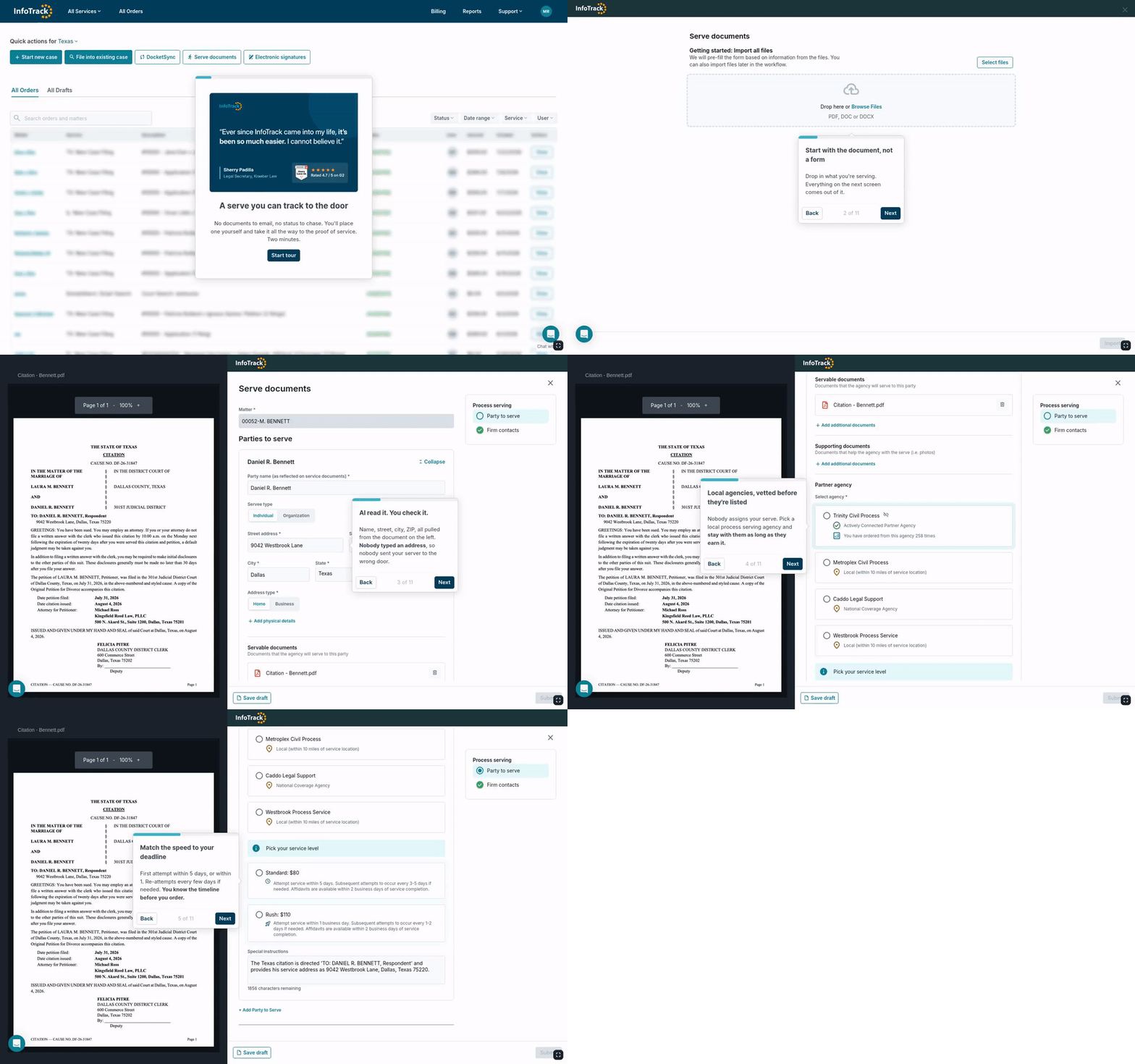
Place a serve in the real product. Two minutes, no signup.
Customer stories
Six firms that file with InfoTrack from inside the case management system they already run.
The trade-off
One keeps you in the dark. The other won't let you choose.
A server you trust. But you can't track the attempts in real time. Was there a first attempt? A second? You wait on an update.
You lose track of it.
Real-time tracking. But it's a faceless dispatch that sends whoever's available. Never a server you know and trust.
You lose your say.
Choose your server. Track every step. Vetted local process servers who know your courts. Try a few, find one you trust, keep going back. Every attempt visible as it happens.
You keep both.
How it works
From upload to served, synced back to the matter in your case management system.
Upload your documents. InfoTrack reads them and fills your order in about 30 seconds. No retyping.
A vetted local server who knows your courts. Keep working with the server you trust.
Every attempt logged with GPS, a timestamp, and a photo, as it happens. Message or call your server.
Reviewed and synced to your matter. In California, filed with the court in one click.
What's at stake
A bad serve doesn't just cost a fee. It costs the deadline. And a serve that gets challenged can cost the judgment.
The order fills from your documents, so no one mistypes the address.
Different days, different times, multiple attempts. A server catches the person, not an empty house.
GPS, a timestamp, and a photo on each attempt. No question whether someone showed up.
Court-ready proof of service, documented and on file if it's challenged.
California · SPARE Act · AB 747
The SPARE Act changes what a valid California proof of service looks like. Check yours before it does.
Questions
A free system takes the filing. You're paying for everything around it: the filing built by AI from your document and checked against the court's filing requirements, InfoTrack fronting the court fees, and the stamped copy, the expense and the status sent back to the matter. You see our fee on every filing before you submit, and there's no contract or subscription.
All 58 California superior courts, for eFiling and for physical filing where a court still needs paper, through the same workflow.
Clio Manage, Smokeball, 8am MyCase, Filevine, LEAP, Neos and Time Matters. Start from the matter, and the stamped copy, the expense and the status come back to it. With iManage or NetDocuments, you pick documents from the workspace and the stamped copies return there. No case management system? InfoTrack works on its own.
No. AI reads the document and builds the filing. You review every field, change anything you want, and press Submit yourself.
The clerk's reason shows on the order, and you refile from there without starting over. InfoTrack doesn't charge for a rejected filing.
Yes, in the same order. The filing goes to the court right away and the serve starts once the court accepts it.
Yes. You choose from vetted local agencies and can use the same one every time. Our fulfillment team knows them on a first-name basis.
It depends on your area and the server you choose. Local process serving agencies set their own rates, and InfoTrack adds a technology fee for the platform. You'll see the exact price when you pick your server, before you order.
InfoTrack fronts each order and bills your firm monthly, on one invoice across every InfoTrack service. Costs tie to the matter automatically for client pass-through.
There's nothing to sign: no license, no contract, no subscription. You pay per filing and see both fees before you submit. Send them the two-minute demo, or the fee summary from your first filing.
InfoTrack eFiling and process serving
Sign up on your own and file your first California case without waiting on anyone. No contract, no subscription, no card needed to start.
Partnerships
Support
©2026 All Rights Reserved | General terms - Privacy policy - Accessibility statement