InfoTrack gives you one platform to place, track, and manage every serve — and lets you choose from vetted, local process servers who know your courts.
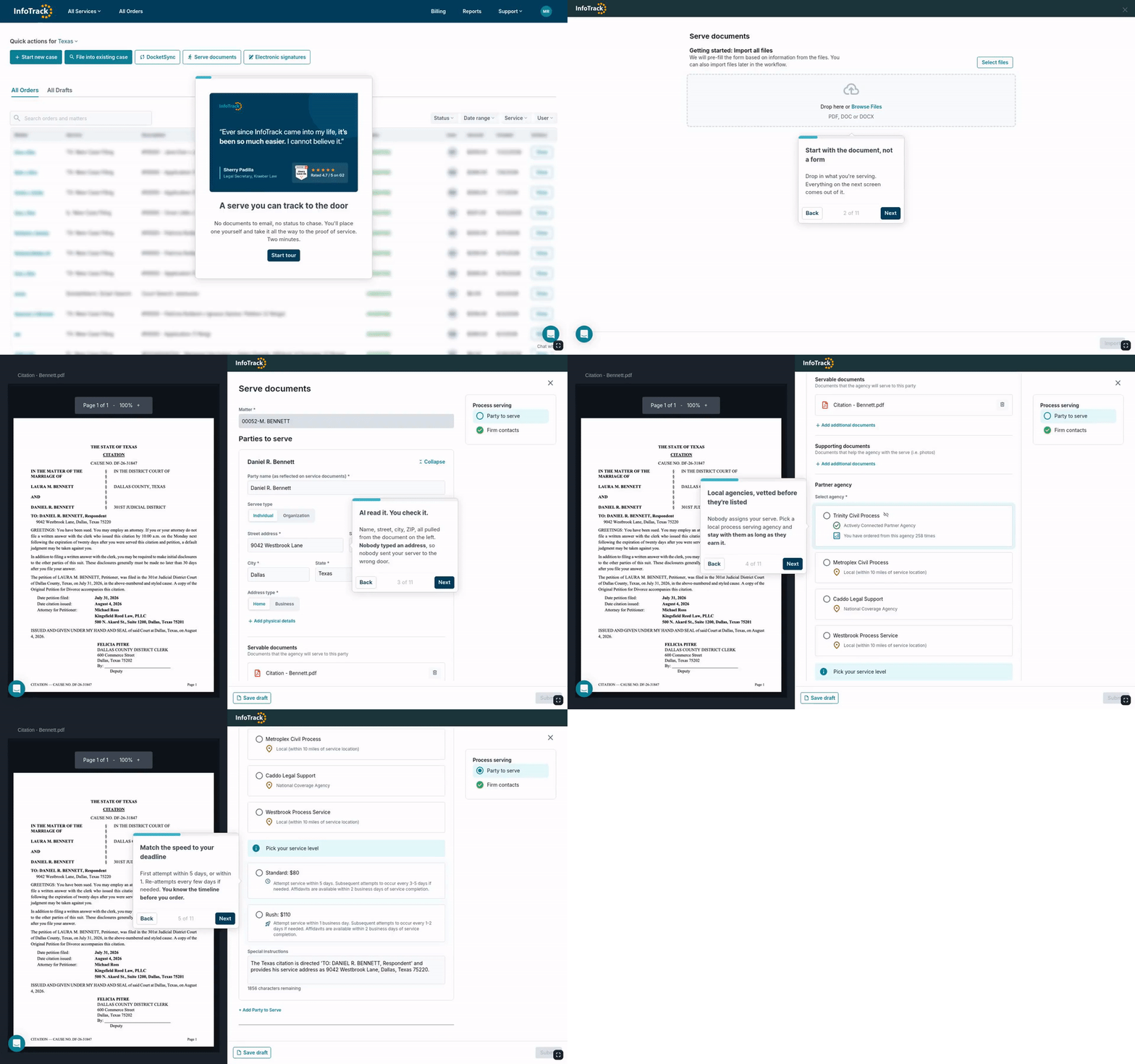
Upload your docs — party names, addresses, and details populate automatically.
Vetted, local agencies who know your courts. Build a real relationship.
GPS-verified updates and server messages, visible as they happen.
In-app messaging or pick up the phone. No middleman.
Skip trace is built in. New address, new serve, same screen.
In eFiling states, check a box and InfoTrack files with the court.
Upload your documents. InfoTrack reads them and fills the order automatically — party names, addresses, and details, pulled straight from the source.
No retyping.
Party names, addresses, and key details populate from your uploaded documents.
Fewer errors, fewer failed serves.
Every auto-filled field is one less chance for a wrong address or misspelled name to kill a serve.
No strangers, no dispatch roulette. You select from vetted, local process serving agencies who know your courts — and you can go back to the same one every time.
Vetted, local process serving agencies.
Small to mid-sized agencies with deep local knowledge — the courts, the neighborhoods, the procedures.
Standard or rush.
Match the service speed to your deadline.
A real-time timeline for every order — GPS-verified attempts, status updates, and messages from your server, visible as they happen.
GPS-verified updates.
Every attempt is logged with location, time, and outcome. No ambiguity about whether someone actually showed up.
Direct server contact.
Message your server in-app or pick up the phone. No middleman. No support ticket. A real person.
When the serve is complete, proof of service is ready for your review. Approve it, and if you're CMS-integrated, it syncs to the matter automatically. In eFiling states, file with the court in one click.
Proof arrives automatically.
No phone calls, no manual uploads, no chasing your server for paperwork.
One-click court filing.
In eFiling states, check a box during order creation and InfoTrack files the proof. One checkbox. No separate workflow.
Book a quick walkthrough tailored to your workflow.
Can I cancel a serve after placing it?
What does InfoTrack do?
InfoTrack connects with your legal software to handle tasks like eFiling, process serving, and eSignatures—all in one place. It syncs your client, case, and billing info automatically, helping you work faster, stay organized, and boost profitability.
How do billing and payments work?
InfoTrack covers the upfront cost of each order, then bills your firm monthly. Here’s how it works.
Can I order a skip trace to locate someone for service?
How does InfoTrack vet its process servers?
How can I add team members to my firm’s account?
Partnerships
Support
©2026 All Rights Reserved | General terms - Privacy policy - Accessibility statement